
FlightView: Flight Tracker
OAG Aviation Worldwide LimitedTravel & Local
1.54.07K Reviews
- Version
- 5.0.13
- Installs
- 1.00M
- Age Rating
- Everyone
Screenshots




Our Review of FlightView: Flight Tracker
 Analysis by Appyee
Ever found yourself anxiously checking the clock at the airport, wondering if your flight is on time or if there's a last-minute gate change? I've been there, and let me tell you, it's no fun. That's where the FlightView: Flight Tracker app swoops in to save the day. After giving it a whirl, I can confidently say that this app is like having a personal air traffic controller right in your pocket.
Useful when the airport is busy
For me, a flight tracker earns its place on a phone when I need to make a quick decision without opening several messages or searching through a booking email. If I'm meeting someone at arrivals, I can follow the flight rather than rely only on the time they expected to land. If I have a connection, keeping the legs of a trip together gives me one place to check the plan. Those are practical uses for FlightView, especially when a journey has more than one flight and the details are easy to lose among travel emails.
A realistic airport day also shows where it helps and where it should not replace common sense. Suppose I am waiting to collect a family member and their arrival time shifts. A tracker can help me decide whether to leave home later or stay put, while destination weather can help me prepare for the conditions after landing. I would still follow airport displays and staff instructions for immediate gate or boarding decisions; a phone app is a useful companion, not a reason to ignore the airport’s own announcements.
Reading information under pressure
The original appeal here is not just having flight details, but being able to get to them when attention is divided. A traveler may be carrying bags, listening for an announcement, or trying to help a child, so a compact view of upcoming flights can be more useful than a crowded travel inbox. I find that organizing a multi-flight trip in advance is a better workflow than adding details while rushing between gates. It gives me a calmer starting point and reduces the chance of having to search for a confirmation at the worst moment.
That said, no screen layout works equally well for everyone. Small text, glare, a busy terminal, or a phone used one-handed can all make checking details harder. I would treat the app as one source of information and keep the flight number or itinerary accessible in another way if reading a screen is difficult in a particular setting. The design may feel straightforward to me, but the experience still depends on the person, device, and environment.
Notifications, attention, and control
Flight alerts can reduce the need to keep opening the app, but more notifications are not automatically better. I would choose only the updates that help with a real decision, such as a status change or a gate update, rather than letting every alert compete with messages and other travel notices. This is especially helpful for people who find frequent sounds or vibrations distracting. Keeping alerts selective can make the important ones easier to notice.
For travelers who do not rely on sound, a notification that appears visually may be easier to catch than an announcement across a noisy terminal, but I would not assume that a phone alert will always arrive at the exact moment it is needed. Keeping the app available and checking it at sensible milestones—before leaving for the airport, while waiting, and before a connection—makes more sense than depending on a single alert. That habit is useful whether someone has sensory needs or simply wants fewer surprises.
First Impressions: Sleek and User-Friendly
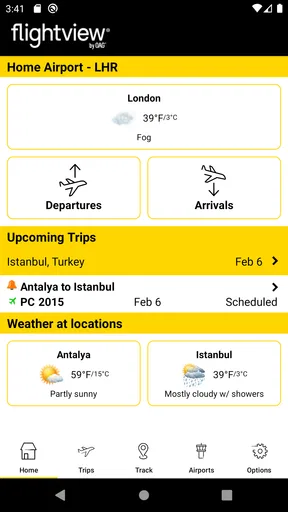
From the get-go, the FlightView: Flight Tracker app stands out with its clean, intuitive design. Navigating through the app is a breeze, which is a huge relief when you're juggling bags and boarding passes. The home screen gives you a quick overview of your tracked flights, upcoming trips, and any alerts you might need to be aware of. It's straightforward and not cluttered with unnecessary bells and whistles.
Tracking Flights Like a Pro
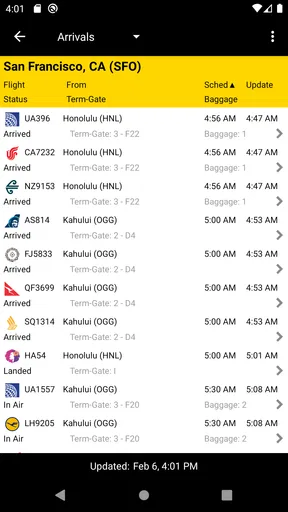
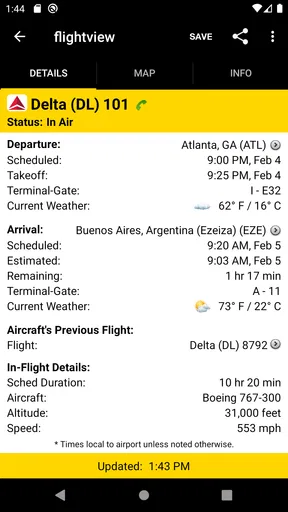
One of the standout features is the real-time flight tracking. You can enter your flight number, and voilà, you get all the juicy details: departure times, estimated arrival, gate information, and even potential delays. It's like having a crystal ball for your flights. I found myself constantly refreshing just to see how accurately it updates—and it didn't disappoint.
Notifications That Keep You in the Loop
Now, if you're anything like me, you appreciate a good notification system. The app sends timely alerts about your flight status, gate changes, and delays. No more missing boarding calls because you were engrossed in a book or grabbing a snack. The notifications are customizable too, so you can choose how early you want to be notified about the different aspects of your flight.
Planning Ahead with Ease
Another nifty feature is the trip planning tool. You can organize your trips by adding multiple flights, which is especially handy if you're hopping from one city to another. It keeps all your flight info in one place, so there's no scrambling through emails or papers trying to find your itinerary. Plus, you can sync it with your calendar for a seamless travel experience.
Weather Updates for Your Destination
One thing that really caught my attention was the weather updates for your destination. This might seem like a small detail, but knowing what to expect when you land can be a lifesaver. Whether you need to pack an umbrella or a pair of sunglasses, having this information at your fingertips is incredibly convenient.
Who benefits most from the trip tools?
The app makes the most sense for people who want a dedicated view of flights rather than using only an airline’s app. Airline apps are usually the direct place to manage that carrier’s booking, while a separate tracker can be more convenient when I want to keep several flight details together, especially across a multi-stop itinerary. For a simple trip with one flight, the airline app or a calendar entry may be enough. I would not add another app just for the sake of it if my existing routine already gives me the information I need.
FlightView is a travel and local app from OAG Aviation Worldwide Limited. It is free to download, with in-app purchases listed from $1.99 to $17.99 per item. Its 1.5 average from around 12,000 ratings is a reason I would approach it with measured expectations rather than assume every traveler will have a smooth experience. More than a million installs show that it has found an audience, but popularity alone does not settle whether it suits an individual’s needs.
Trade-offs and practical checks
Flight information can change quickly, so I would use the tracker to stay oriented, not as the final authority for boarding or a tight connection. The airport display and airline staff are the sensible fallback when details conflict or a decision has immediate consequences. A useful habit is to check the flight number carefully when adding a trip, then review the full itinerary before departure; that small bit of preparation is more reliable than trying to reconstruct a journey while moving through a terminal.
Another trade-off is attention. A tracker can spare repeated searches, yet checking it constantly can make travel feel more stressful rather than less. I prefer to set up the trip ahead of time, choose useful notifications, and look again when a change would affect what I do next. Weather information is best treated as a planning cue—for clothing or what to pack—rather than a promise about conditions at the exact moment I arrive.
For accessibility, the app’s uncomplicated presentation may help someone who wants a focused flight view, but it cannot remove every barrier. A crowded screen can still be difficult to read, and travelers who find touch navigation uncomfortable may prefer to keep essential details in a format they already use confidently. Someone with low vision, hearing differences, limited dexterity, or sensory sensitivity should judge the experience on their own device and in their typical travel setting rather than assume that a simple design guarantees a comfortable fit.
The app is available for Everyone and is listed for devices running version 7.0 or later; its current version is 5.0.13. Those details make it broadly accessible to many device owners, but the best choice still depends on what a person needs from a flight tool. If booking changes and carrier-specific help matter most, I would start with the airline. If I mainly need to keep flight progress, trip details, and destination weather in view, FlightView has a more focused role.
The Verdict: A Must-Have for Frequent Flyers
All in all, the FlightView: Flight Tracker app is a game-changer for anyone who flies regularly. It takes the stress out of air travel by keeping you informed every step of the way. Whether you're a seasoned traveler or just someone who takes the occasional trip, this app is a trusty companion that ensures you're never caught off guard.
If you're ready to make your travels smoother and more predictable, give this app a shot. You can download it on both Android and iOS, and trust me, once you've got it, you'll wonder how you ever traveled without it.
My inclusive take
I would recommend giving FlightView a try if you often track arrivals, juggle multiple flights, or want trip information gathered in one place. I would be more cautious if you need a guaranteed accessible interface, rely on a tracker as your only source for urgent updates, or are already well served by your airline’s tools. Its flight-focused organization and alerts can make a busy travel day easier to manage, while its low average rating is a clear reason to test it against your own needs before depending on it. For me, it is most useful as a supporting tool: helpful for planning and staying oriented, but not a substitute for official airport and airline guidance.
Verdict
Strengths of FlightView: Flight Tracker
- Real-time flight updates keep you informed.
- User-friendly interface for easy navigation.
- Customizable notifications for flight changes.
- Detailed airport maps and terminal info.
- Supports multiple airlines and airports worldwide.
Limitations of FlightView: Flight Tracker
- Ads can be intrusive and distracting.
- Frequent pop-ups for premium upgrades.
- Some features require a stable internet connection.
- Limited offline functionality for travelers.
- Occasional lag in loading flight data.
Similar Picks in This Category
View All
Google Maps
Google LLC3.4

Google Maps Go
Google LLC4.1

Booking.com: Hotels & Travel
Booking.com Hotels & Vacation Rentals4.8

Google Earth
Google LLC3.8

Skyscanner Flights Hotels Cars
Skyscanner Ltd4.8

trivago: Compare hotel prices
trivago N.V.4.4
Frequently Asked Questions
What features does FlightView: Flight Tracker offer?
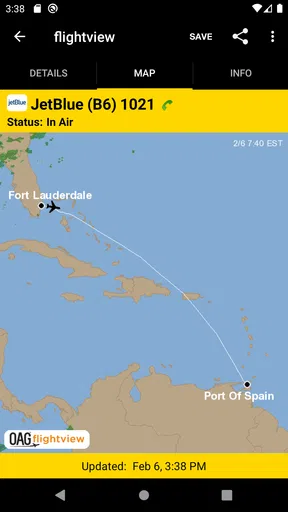
FlightView: Flight Tracker provides real-time flight status updates, including departure and arrival times, delays, and gate information. Users can track flights on a map, access airport information, and receive push notifications for changes. The app also offers features for planning, such as weather forecasts and airport amenities.
Is FlightView: Flight Tracker free to use, or are there in-app purchases?
FlightView: Flight Tracker is free to download, offering essential tracking features without charge. However, it includes in-app purchases that unlock premium features, such as ad-free experiences and additional tracking options. Users can choose to upgrade for a more comprehensive experience if they find the basic version limiting.
How accurate is the flight tracking information provided by the app?
FlightView: Flight Tracker is known for its accuracy, sourcing data from reliable aviation authorities and airlines. While generally precise, users should be aware that unexpected changes can occur in real-time and are dependent on the information provided by airlines, which may occasionally cause brief discrepancies.
Can FlightView: Flight Tracker be used offline?
FlightView: Flight Tracker requires an internet connection to provide real-time updates and notifications. Some information, like previously downloaded flight schedules, may be accessible offline, but for the most accurate and updated data, a connection is necessary. Users should ensure they have data access while traveling.
Does FlightView: Flight Tracker support international flights?
Yes, FlightView: Flight Tracker supports both domestic and international flights. Users can track flights across various regions and receive updates on international departures and arrivals. The app is designed to cater to frequent travelers who need comprehensive tracking capabilities regardless of their destination.
